Project Management for Freelancers: A 3-File Setup
Project management for freelancers stays manageable with three linked files for clients, tasks, and weekly work, plus a Friday review of what changed.
By Professional Business Bundle by Cosmo Suite · Editorial policy
Published · 8 min read
Freelance project management is how you keep client work, tasks, deadlines, and updates straight across engagements. It gets messy when those details live in separate places that do not agree. A solo consultant can start with three files: a client list, a task register, and a weekly plan.
That setup gives you a place to see who is waiting, what is due, and what can fit before Friday. It does not require a new project app if you work alone and own the updates. A ready-made project manager workbook for tracking several client projects is one option if you want the project views already connected.
Project management for freelancers at a glance
| File | What goes in it | Question it answers |
|---|---|---|
| Client list | Client, active project, next milestone, next update date | Who needs attention? |
| Task register | Deliverable, task, due date, owner, status, dependency | What work is open? |
| Weekly plan | This week's capacity, chosen tasks, client follow-ups | What can I finish next? |
For a freelancer, a useful project system connects the client, the task, and the available week. Keep one source for task dates, then use the weekly plan to select work rather than creating a second copy of every task. If you are deciding what belongs in the project file itself, this project manager template checklist covers the views and fields worth checking.
What should the three files contain?
Keep the jobs separate: the client list tracks the relationship, the task register tracks the work, and the weekly plan says what you can take on. You can keep them as three tabs in one workbook or as separate documents, as long as you can trace a weekly task back to its client and project.
What belongs in the client list?
A client list is a short index of the relationship and the next decision, not an archive of every email. Use one row per client or active engagement. Include the project name, current phase, next milestone, the next action you owe, the next action the client owes, and the date of your next update.
| Client | Active work | Next milestone | Waiting on | Next update |
|---|---|---|---|---|
| Northline Studio | Monthly reporting | October report reviewed | Client feedback | Friday |
| Cedar Works | Website refresh | Draft approved | Copy approval | Wednesday |
| Fieldnote Co. | Product photos | Select final images | Your edit | Thursday |
| Alder Practice | Brand guide | Direction agreed | Client decision | Tuesday |
These names and dates are illustrative. The useful part is the waiting-on column. It separates work you can do now from a client decision that blocks the next task. If you keep a separate meeting note, record the decision and link it from the client row rather than repeating the full conversation there.
What belongs in the task register?
A task register is the single list of actions you can finish and report. Put the detail of the work there, with one row for each task. Give it a client, project, owner, due date, status, and dependency where one exists.
| Client | Task | Owner | Due | Status | Depends on |
|---|---|---|---|---|---|
| Cedar Works | Revise homepage draft | You | Tue | In progress | Approved copy |
| Fieldnote Co. | Export selected images | You | Thu | Not started | Client selects |
| Northline Studio | Check report figures | You | Fri | Not started | October source data |
| Alder Practice | Send two direction options | You | Tue | Waiting | None |
Avoid making each project a separate tracker unless the client needs a distinct system. One register makes it easier to spot two deadlines landing on the same day. A task list is not a promise that the work fits; capacity belongs in the weekly plan.
What belongs in the weekly plan?
A weekly plan is a selection of tasks from the register that fits after meetings, admin, and recurring work. It is not another place to maintain due dates.
For a solo consultant with four monthly retainers, each client may need a report, a review, or a decision in the same week. List the fixed appointments first. Then reserve time for client work and add only the tasks that can fit around those commitments. Leave a space for urgent work. If every hour is booked before Monday starts, one late approval makes the whole plan fiction.
The week's view can be a filtered list, a calendar, or a short written plan. Whichever format you use, keep the task's original due date in the register and treat the weekly date as the day you intend to work on it. That distinction helps when a task slips: you can see both the commitment and the plan.
How do you connect the files without duplicate updates?
Connect the files with a project name or ID and keep the due date in one source. The client list should point to the task register; the weekly plan should select tasks from that register instead of copying them into a second tracker.
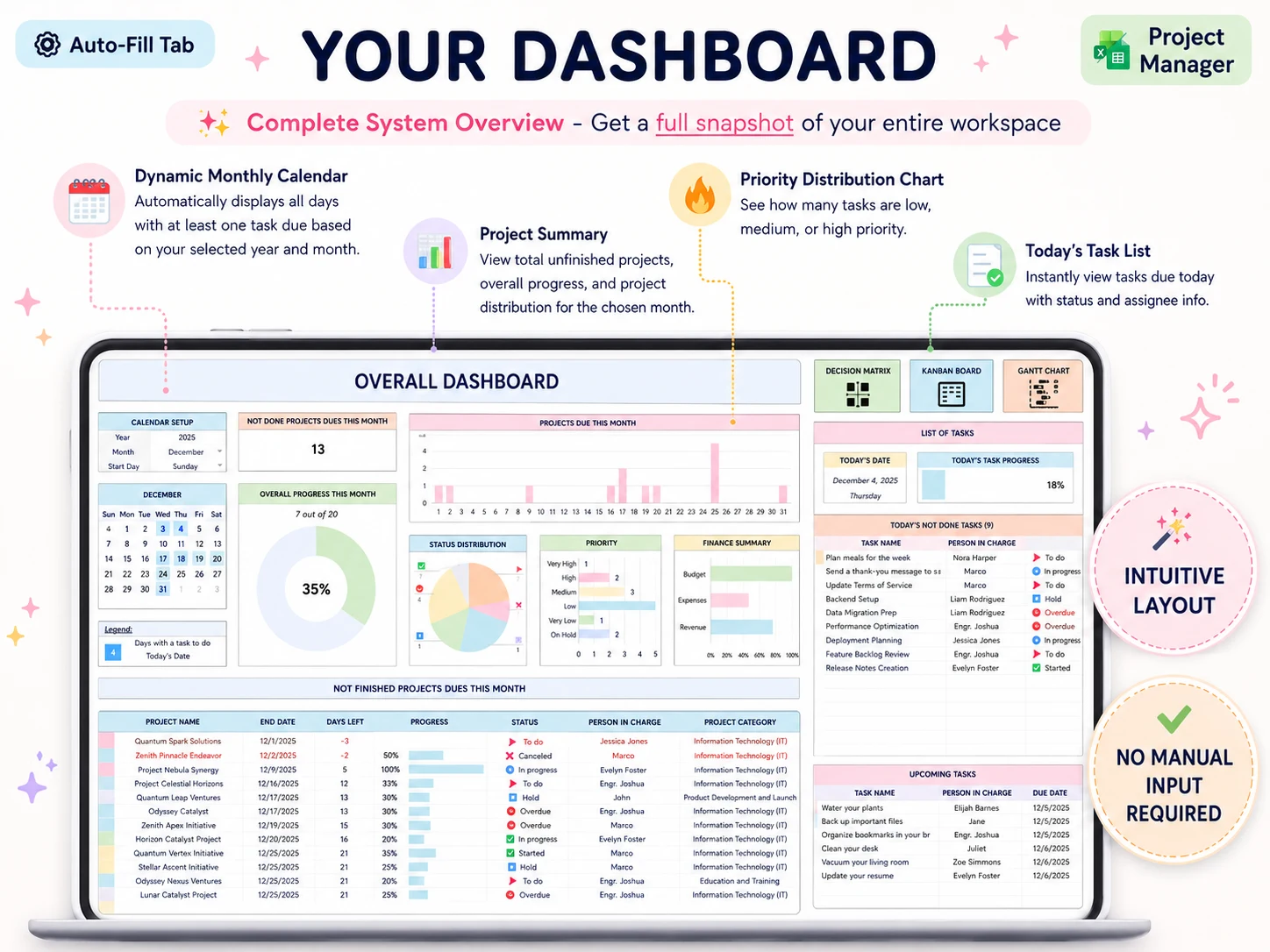
The simplest version uses consistent project names in all three files. A more capable workbook can use a project selector or filter to show related tasks and dates. The Professional Business Bundle's project overview with a project selector uses that pattern, but you can apply the same rule in a basic spreadsheet: enter a task once, then use a view to find it.
Use a change note when the plan moves. Record the date, what changed, and why. For example: “Client approval arrived Tuesday, so the first draft moves from Wednesday to Friday.” This is a working note, not a legal record. Its job is to keep your next update consistent with the task dates.
How do you choose what fits this week?
Choose work by deadline, dependency, and available time, then confirm the selection against what each client is waiting for. The earliest due date is not always the next task if a decision or asset is still missing.
Try this order in a Friday review:
- Filter the register to open tasks due in the next two weeks.
- Mark any task blocked by a client decision or missing input.
- Put fixed meetings and recurring deliverables on the week first.
- Estimate the remaining work in rough blocks, not false precision.
- Select the tasks that fit, then tell each client what moved.
Your time estimates do not need to predict every hour. They should reveal a collision before you promise a date. If two projects need the same two-hour review slot, decide which one moves or ask the client which deadline matters more. Do not quietly let both dates pass.
What should the Friday client update say?
A useful Friday update names what moved, what is complete, what comes next, and what decision you need from the client. Pull each point from the client list and task register so your email matches the plan.
For example, a short update might say: “The first draft is ready for review. The image selection is still open, so the final export is not scheduled yet. Please choose the preferred direction by Tuesday; I will send the revised delivery date when that choice is in.” The wording is plain because the client needs to know the state and the next action.
For larger projects, include the original milestone date when it has changed and say what caused the move. A project plan that stays current as dates shift can help you keep dependencies visible. The goal is not to send a dashboard. It is to make the next decision easy to find.
When should a freelancer use a project app?
Use a project app when the job depends on shared editing, client access, reminders, or automation. A spreadsheet can be enough when one person maintains it and the client receives updates by email.
The Project Management Institute defines project management around applying skills, tools, and techniques to meet project requirements. In practice, the size of the tool should match the work. Asana's guide to managing multiple projects and ClickUp's freelance project management article both focus on keeping work organized across projects; ClickUp also makes a case for its own app features. Treat vendor guides as examples of software workflows, not independent proof that every freelancer needs another subscription.
An app is a good choice if clients need to log in, more than one person changes tasks, or missed reminders create real risk. A file is easier to own when you need a short list of tasks and dates and do not need those features. There is no prize for moving a simple process into a complex tool, and there is no saving if a spreadsheet makes the work harder to maintain.
Why trust this article
Professional Business Bundle sells downloadable business planning files, so it has a commercial interest in spreadsheets. This guide describes a general workflow and names where an app offers capabilities a spreadsheet does not. It does not claim that a file replaces client communication software or project apps. Read more about the publisher on the about page and its editorial policy.
Where the Professional Business Bundle fits
The Professional Business Bundle includes a Project Manager workbook with 15 tabs, plus a Professional Planner for OneNote with 215+ pages, Weekly Planner Pro with 8 tabs, and a budget spreadsheet with 28 tabs. The four files are available for Excel 365 and Google Sheets, with the planner for OneNote; the listed price is $9 once.
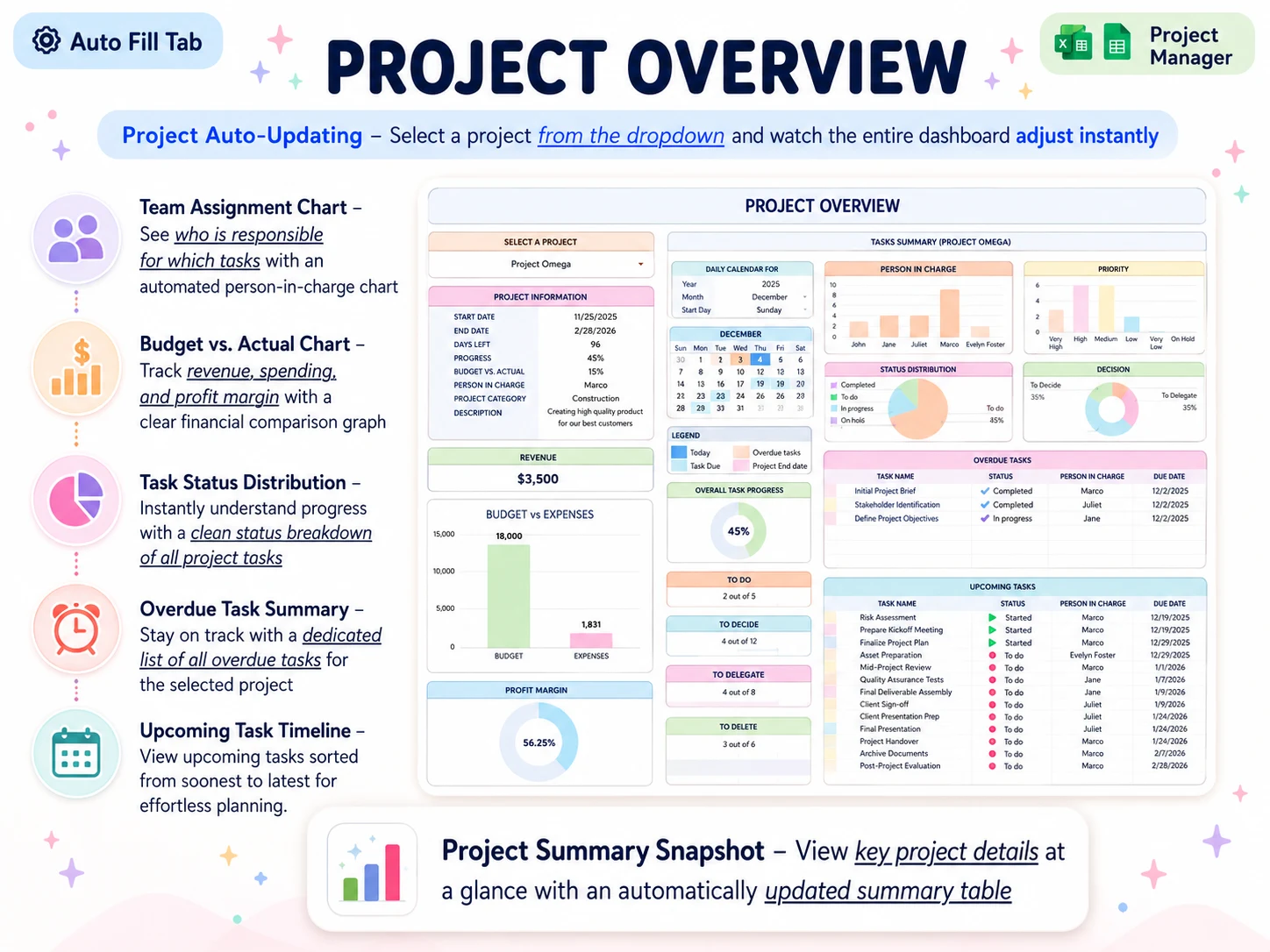
If you want the task, client, and week views in a ready-made set of files, see the Professional Business Bundle. Its project workbook includes a project overview, task schedule, and per-project timeline. The product is a set of files, not a project app: it does not provide live collaboration, notifications, or a client portal.
Frequently asked questions
How do freelancers manage multiple projects?
Keep one client list, one task register, and one weekly plan. Give every task a project, owner, next action, and due date, then review the open work and client decisions on a fixed day.
What is the best project management tool for a freelancer?
The best tool depends on how you work. A spreadsheet can suit a solo freelancer who owns updates and needs a simple view of tasks and dates. Use an app when clients need access, several people edit at once, or you need notifications and automation.
How many projects can a freelancer manage at once?
There is no useful fixed number. Compare each project's remaining work and deadlines with the hours you can actually give it. Include recurring client work, admin, and review time before you accept another deadline.
How do I organize freelance client work?
Give each client a row with the current project, next milestone, next action, and date you last sent an update. Keep task detail in one register, then use a weekly view to decide what fits.
Can I manage freelance projects in Excel or Google Sheets?
Yes, if you can keep one current file and do not need live co-editing, client logins, or automatic reminders. Use a project app when those features are part of the job.
What should a freelance project tracker include?
Track the client, project, deliverable, task, owner, due date, status, next action, and any dependency. Add a separate note for a scope or date change so the current plan has context.
Frequently asked questions
How do freelancers manage multiple projects?
Use a client list, one task register, and a weekly plan. Put a project, owner, next action, and due date on each task. Review open work and client decisions on a set day.
What is the best project management tool for a freelancer?
Start with the tool that matches how you work. A spreadsheet suits a solo freelancer who owns updates and needs a simple view of tasks and dates. Choose an app when clients need access, several people edit at once, or reminders and automation matter.
How many projects can a freelancer manage at once?
There is no useful fixed number. Compare each project's remaining work and deadlines with the hours you can actually give it. Include recurring client work, admin, and review time before you accept another deadline.
How do I organize freelance client work?
Give each client a row with the current project, next milestone, your next action, and the date you last sent an update. Keep task detail in one register, then use a weekly view to choose what fits.
Can I manage freelance projects in Excel or Google Sheets?
Yes, if you can keep one current file and do not need live co-editing, client logins, or automatic reminders. Use a project app when those features are part of the job.
What should a freelance project tracker include?
List the client, project, deliverable, task, owner, due date, status, next action, and dependencies. Add a note when scope or dates change so the current plan has context.
