How to Write a Project Plan (And Keep It True After Week One)
Project plan template: set the brief, phases, owners, and dates, then update the task view as work changes. This six-project example shows what to check.
By Professional Business Bundle by Cosmo Suite · Editorial policy
Published · 9 min read
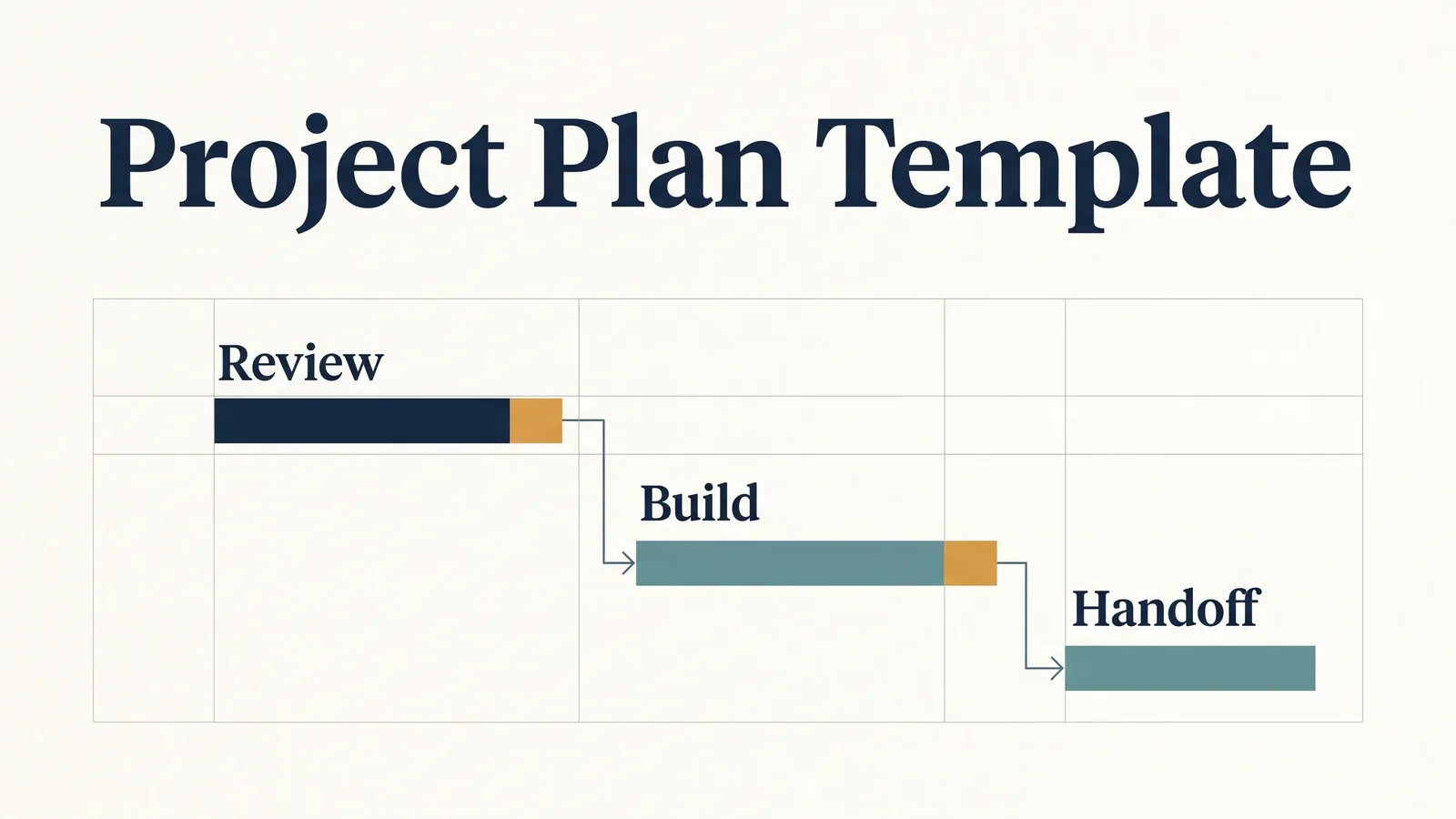
Use a project plan template to keep work connected after kickoff. A polished page with a goal and colored timeline goes stale by Friday if tasks, owners, and dates live somewhere else.
For a small business, the practical answer is a short brief plus a task list that feeds the schedule. Write the outcome and boundaries first. Then add phases, owners, dates, and a simple rule for recording changes. This guide shows what to include, how to build it, and how to keep it current when work moves. If you want a ready-made workbook for several projects, the Professional Business Bundle project files are one option to compare against these checks.
Project plan template at a glance
Key takeaways
- Start with the result, boundaries, milestones, task owners, dates, and a way to record changes.
- Use a task view that shows the work behind each milestone.
- Check dependencies when a review or task date moves.
- Choose software when your team needs live editing, client access, or notifications.
A project plan is the working record of the result, boundaries, ownership, and dates, linked to the tasks that deliver the work. A useful one has a short explanation of the work and a working view of its tasks. The explanation answers why and what; the task view makes the next action, owner, and date visible.
| Part | What to write | Check before kickoff |
|---|---|---|
| Outcome | The result the client or team will accept | Can two people describe “done” the same way? |
| Scope | Included work and explicit exclusions | Is the next request inside the boundary? |
| Phases and milestones | The main stages and evidence of completion | Does each milestone have a finish condition? |
| Tasks | Work small enough to own and schedule | Is every task assigned to one person? |
| Dates and dependencies | Start, due date, and work that must happen first | Does a delay move the dates that depend on it? |
| Change record | What changed, when, and why | Can someone explain a moved date next week? |
Keep the written brief concise and let the task view hold the detail. If the project has one owner and few dependencies, a spreadsheet may be enough. If several people must edit together or a client needs access, use a project app that supports those needs.
What belongs in a project plan?
A project plan needs enough context to guide decisions and enough task detail to make the next week actionable. Asana’s guide separates scope, budget, resources, and schedule as plan components, and its project plan template library shows how formats vary by work. The Project Management Institute also lists scope, schedule, cost, and change management as plan components (PMI project plan elements). Keep the brief in one document or connect it to a task workbook, and make clear which view holds the current dates.
What result are you agreeing to deliver?
Write the outcome as something a client can review. “Improve the website” is too broad. “Publish the approved services page with the new copy, contact form, and mobile layout” gives the team a finish line to check.
Add the expected delivery date and the person who accepts the result. If approval depends on a client review, record that as a task with an owner and a due date. A plan should show work that happens outside your own team too.
What is inside the scope?
List the work included and the requests that would need a new decision. A short boundary prevents a routine revision from silently becoming a second deliverable. Avoid legal language unless a qualified adviser has reviewed it; this is a working agreement about the project, not a contract substitute.
For example, a five-page site refresh might include the home, services, about, contact, and one case-study page. A new booking system or a second language version is a separate request. Put those examples where both sides can find them.
Which phases and milestones prove progress?
Group related tasks into a few phases, then define a milestone as evidence that a phase is complete. UC Berkeley’s project template guidance also calls out tasks, subtasks, and milestones as the schedule’s working parts (templates for all projects). “Design” is a label. “Client approves the desktop and mobile page layouts” is a milestone you can verify.
A small consultancy might use discovery, draft, review, and delivery. Each phase needs a finish condition and the next dependency. When a milestone moves, look at the tasks that rely on it before promising a new delivery date.
Who owns each task and date?
Give each task one accountable owner, even if other people contribute. Add the due date and a useful status such as not started, in progress, waiting, or done. “Waiting for client copy” tells you more than a generic “in progress” label.
Break down work until the owner can estimate it and report a real change. “Build the site” is too large. “Draft the services page” and “check mobile layout” are easier to assign and review. Do not add detail just to make the plan look busy.
How to build the plan in six steps
Build the plan in the order that decisions depend on each other: outcome, boundary, phases, tasks, dates, and review. This keeps a schedule from becoming a list of dates without a reason behind them.
- Write the outcome. State what will be delivered, who accepts it, and the target date.
- Set the boundary. List included work, exclusions, and assumptions that could change the effort.
- Choose phases. Use the fewest stages that make progress and approval clear.
- Create tasks. Turn each phase into work with one owner and a finish condition.
- Order the work. Mark tasks that depend on a review, asset, or decision. Add dates only after the sequence is clear.
- Set a review rhythm. Choose a weekly check-in, update the task view, and record important changes.
Before kickoff, compare the dates with the people who will do the work. A plan built without their capacity is a wish list. If a task needs a client response, include the waiting time instead of treating approval as instantaneous.
How to keep the schedule current after week one
A schedule stays useful when its dates come from the task list and someone records why a change happened. A static timeline may look complete, but it does not tell you what should move when one task slips.
Here is an illustrative schedule for one of those six projects, not a customer case. Methodology for this illustration: each phase begins on the next Monday after the prior phase ends, weekends are excluded, and review holds the start of build. The review was due October 12 and arrives October 26, two weeks later. The 10 working days move the build and handoff dates by the same amount.
| Milestone | Original plan | Revised plan |
|---|---|---|
| Client review | Oct 12 to 16 | Oct 26 to 30 |
| Build | Oct 19 to 23 | Nov 2 to 6 |
| Handoff | Oct 26 | Nov 9 |
Check whether the plan moved only the review task or also flagged the work that depended on approval. The timeline should show the dependency as well as the moved review date; otherwise the handoff can still show its old date.
Keep a baseline: the dates the team agreed to at kickoff. The table uses a simple sequence with no overlapping work; a real plan may need different dates when owners can work in parallel. When a date changes, keep the original visible and give the reason, such as a 14-day delay in client review. Keeping both dates in view separates a planning change from a missed commitment.
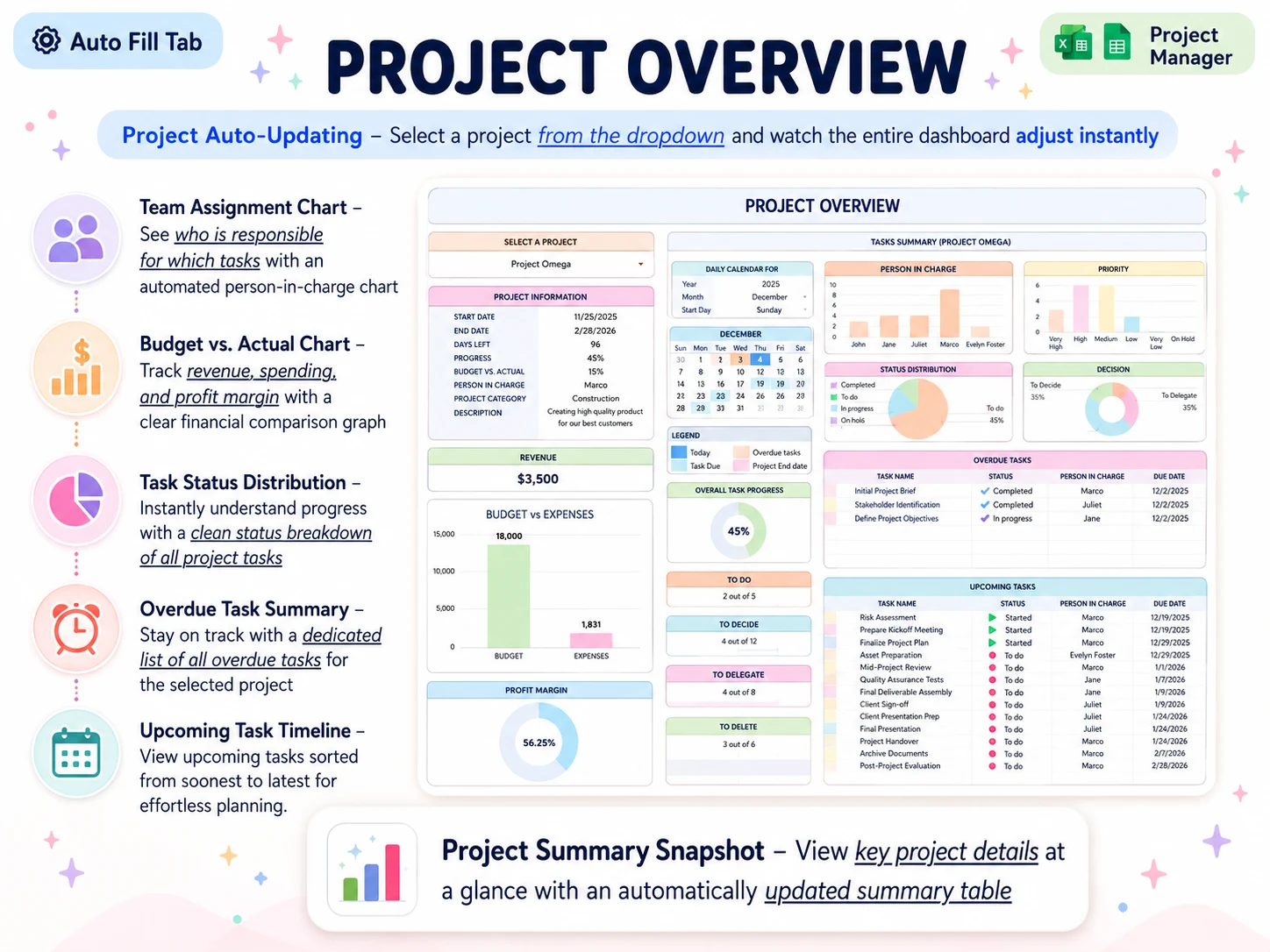
A Friday review can be simple: filter for overdue tasks, confirm next week's work with each owner, check dependencies, and update the client on decisions needed. A project overview workbook can put those dates beside the status and overdue list. The project overview in a project manager template with a project selector can show status, overdue work, and upcoming dates for one project at a time.
Should you use a spreadsheet or project management software?
A spreadsheet is reasonable when one owner maintains the plan and the team can work from a shared file without live updates. Microsoft’s Excel project management templates show the kind of project and task planning a workbook can hold. Choose project software when you need simultaneous editing, client access, notifications, or automation. Choose based on your operating needs.
A workbook can bring project details, tasks, owners, dates, and a timeline into one place. But it will not send reminders or create a client portal. If the project depends on those features, pick software built for them. If you have a small team and already use Excel 365 or Google Sheets, a file may be simpler to maintain.
For a broader look at how to assess a connected workbook, see the project manager template checklist. The Professional Business Bundle includes a Project Manager workbook with 15 tabs, including a project overview, task schedule, and per-project timeline. It is sold as a one-time file, alongside a planner, weekly planner, and budget spreadsheet, for $9 once. The files are available for Excel 365 and Google Sheets; they do not provide live collaboration, notifications, or client access.
What makes a project plan hold up?
The plan stays credible when people can see what changed and what they need to do next. The weekly review and task view keep the plan up to date.
Keep one source for dates. If the task list and timeline are edited separately, choose which one owns the date and update the other from it.
Make changes visible. Record the old expectation, the new date, and the reason. You do not need a long report for every small adjustment.
Limit the detail horizon. Keep near-term work specific. Leave later phases at milestone level until you know more about the work.
Name the decision owner. A task can have helpers, but one person should confirm completion and raise blockers.
Review exceptions first. Start with overdue, waiting, and newly changed tasks. A list of completed work is useful, but it rarely tells you where a decision is needed. A project planning workbook with an overview can put that review in one file.
Why trust this article
The Cosmo Suite team makes the Professional Business Bundle, so we have a commercial interest in project planning tools. The product details here come from our own Project Manager file. The planning guidance is checked against the sources listed with this article. Read our about page and editorial policy, and check that any template fits your team's actual process before using it.
Where the Professional Business Bundle fits
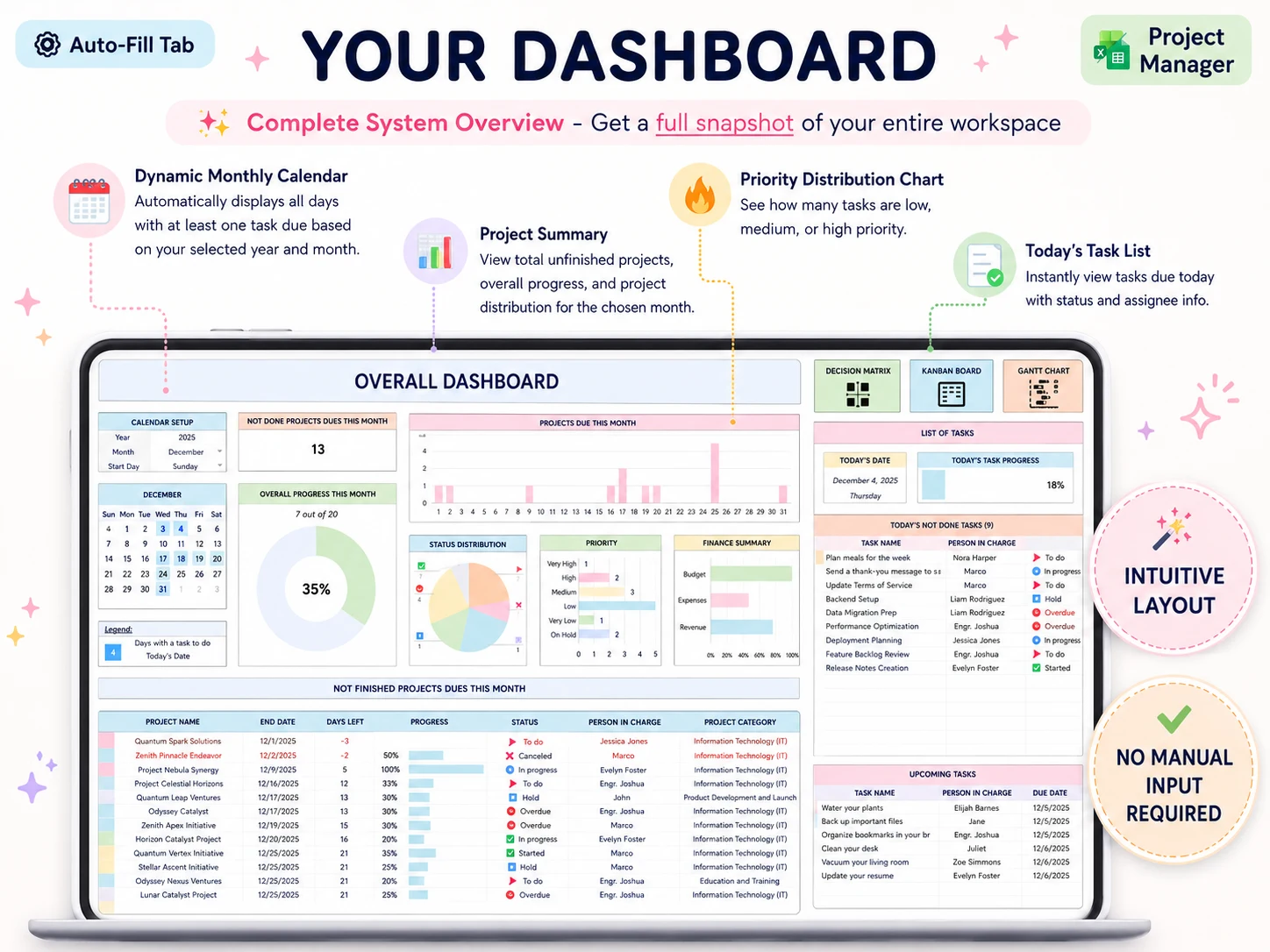
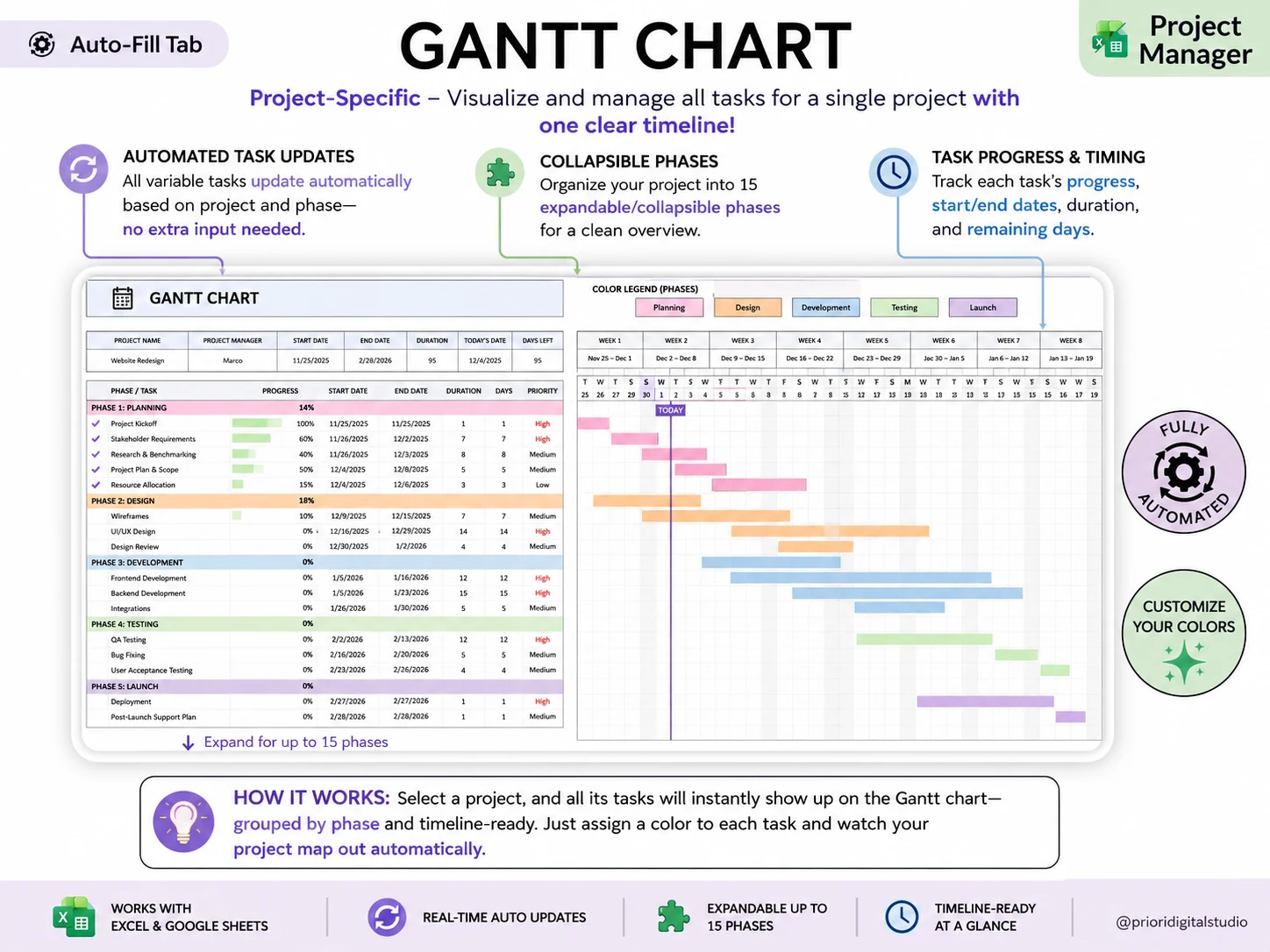
The Professional Business Bundle (professionalbundle.site) is for a solo consultant or small business that wants project details, task ownership, and dates in files it can keep. Its Project Manager workbook has 15 tabs, including an overview and a per-project timeline. The task schedule and project selector are visible in the real screenshots below.
The bundle also includes a Professional Planner for OneNote with 215+ pages, Weekly Planner Pro with 8 tabs, and a 28-tab budget spreadsheet. Excel versions require Excel 365, and Google Sheets versions are available. A step-by-step YouTube tutorial is included. The price is $9 once.
It is not project management software. There is no real-time co-editing, notifications, client portal, or automation beyond the workbook's formulas. If those are part of how you deliver work, choose a project app that provides them. If your work is small enough for an owned file, see the project planning files included in the bundle.
Frequently asked questions
What should a project plan template include?
Include the outcome, scope, milestones, tasks, owners, dates, assumptions, and a way to record changes. A small project may not need a separate document for every item. Keep the plan short enough to review and connect each milestone to the work that proves it is done.
How do I write a project plan step by step?
Start with the result and boundaries. Break the work into phases, define a finish point for each, turn phases into tasks, and give each one owner and a due date. Then check dependencies and capacity. Save a baseline before work starts and revise dates when a decision changes the plan.
Can I use Excel or Google Sheets as a project plan?
Yes, when one person owns updates or the team is small and does not need live collaboration. A workbook can keep tasks, dates, owners, and a timeline together. Use project software when several people need simultaneous editing, notifications, client access, or automation.
What is the difference between a project plan and a project schedule?
A schedule is the time view: tasks, sequence, dates, and milestones. A project plan also explains the outcome, scope, owners, assumptions, budget, and how changes will be handled. The schedule is one part of the plan, not a substitute for it.
How detailed should a project plan be?
Detailed enough that each owner can see the next action, the finish condition, and the date that matters. Avoid describing every small step months ahead. Plan near-term work in more detail, then add detail to later phases as you learn more.
When should I update a project plan?
Update it when scope, ownership, dependencies, or dates change, and review open work on a fixed day each week. Record why a baseline date moved. If the plan changes without a note, the next person cannot tell whether the project slipped or the expectation changed.
Sources
Keep reading
Project Templates
Project Manager Template: The One Feature That Decides Whether You Keep Using It
Project manager template guide: the 5 tests a file must pass, a 6-project worked example, and when per-seat software beats a spreadsheet. Pick yours fast.
· 7 min read
Project Templates
How to Run Projects in Google Sheets (Without Add-ons or Scripts)
Project management template Google Sheets: build a task register, status dropdowns, and a project view. See the fields and checks a small team needs.
· 8 min read
